CNC Condition Monitoring
Designing CNC Vibration Alerts That Do Not Cry Wolf
Use persistence, reset and escalation rules to turn noisy CNC vibration features into understandable maintenance alerts.
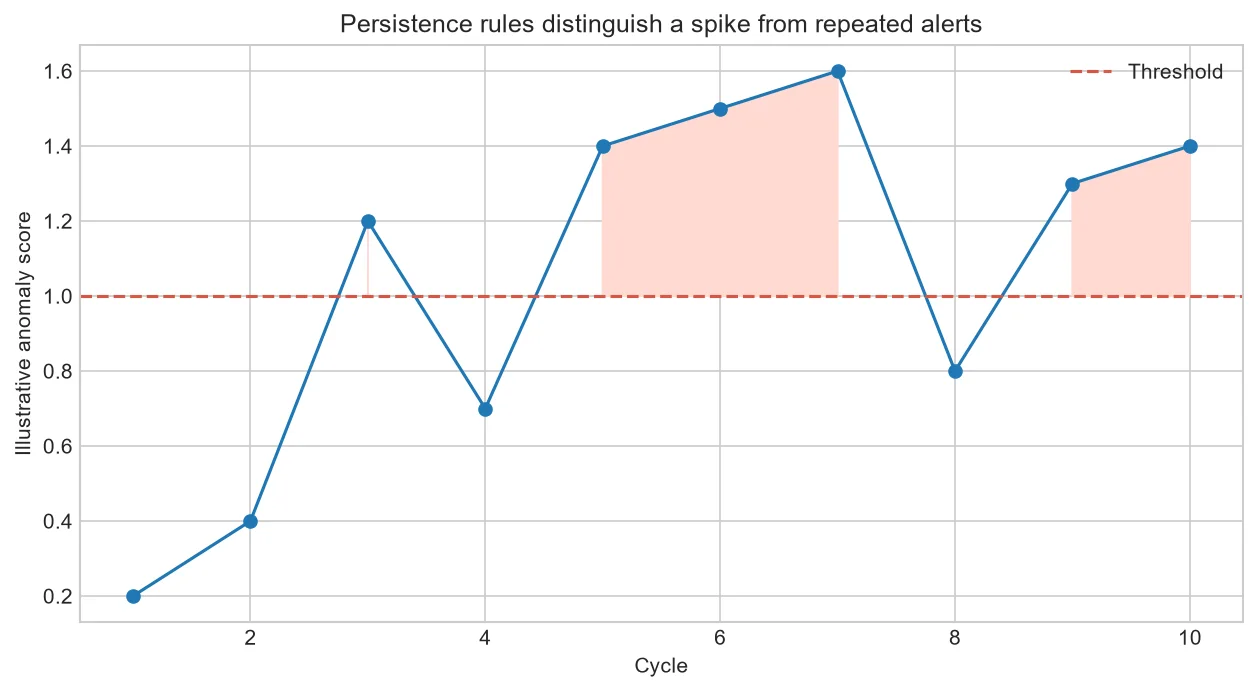
A threshold answers whether one value is unusual. An alert policy answers when people should act. Persistence rules can reduce nuisance alarms, but they also introduce delay and must be tested against realistic event sequences.
Why one point is rarely enough
A chip strike, transition or sensor disturbance can create a brief exceedance. Requiring several abnormal cycles or a proportion within a rolling window can focus attention on sustained change.
Persistence has a cost
More confirmation reduces sensitivity to isolated noise but delays response. The right balance depends on the monitored failure timescale and inspection workflow.
Define reset behavior
An alert that disappears after one normal point can chatter. Require a documented recovery sequence and consider a separate lower reset threshold.
Communicate the evidence
The alert should show the feature, limit, contributing cycles, machine state and recent history. A red badge without context is difficult to trust.
A complete rule in plain language
Trigger review when three of five comparable cycles exceed the warning limit. Escalate when five consecutive cycles exceed the higher limit. Reset only after five comparable normal cycles.
If the machine changes operation, pause the sequence rather than counting incomparable cycles. Missing or rejected sensor records should not silently count as normal.
| Policy part | Decision |
| Trigger | How much evidence opens an alert |
| Escalation | What raises urgency |
| Reset | What closes the alert |
| Inhibit | When evaluation pauses |
Common mistakes to avoid
- Reporting point accuracy only.
- Leaving reset undefined.
- Counting missing data as healthy.
Frequently asked questions
Does persistence always improve alerts?
No; it can miss brief important events or respond too late.
What is hysteresis?
Using different trigger and reset boundaries to reduce chatter.
Should every feature have its own alert?
Often a combined, interpretable policy is easier for operators to manage.
Practical workflow for this method
Replay chronological records through the exact state machine, including operation changes and missing files. Static scatter plots cannot test alert behavior.
Track acknowledgement, inspection result and resolution so the alert policy can be evaluated with operational outcomes.
About the data used in this guide
The charts use a small teaching sample selected from machines M01, M02 and M03, primarily operations OP05 and OP06. The source records tri-axial acceleration at 2 kHz and labels available examples as good or bad. Label coverage is uneven across machine-operation groups, so missing groups are not treated as healthy evidence. These figures are transparent worked examples, not population estimates or universal fault thresholds.
Dataset: CNC Machining Data, CC BY 4.0. Recommended citation: Tnani, Mohamed-Ali; Feil, Michael; Diepold, Klaus. Smart Data Collection System for Brownfield CNC Milling Machines: A New Benchmark Dataset for Data-Driven Machine Monitoring. Procedia CIRP 107 (2022), 131–136. Research paper.
We explain what the selected data supports and avoid naming a mechanical fault when the dataset only provides a good/bad process label. A machine should be inspected by a qualified person before maintenance or safety decisions are made.